Carmen Documents Workflow Example

Download Carmen Now!

"THE TRAINING MANUAL"
  1. Signing Out a Working Copy

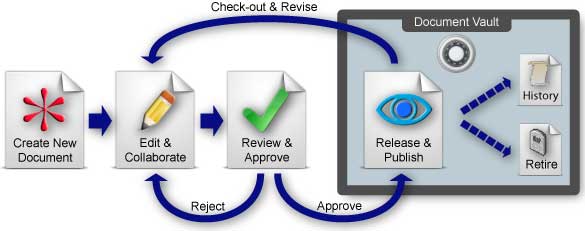
    Julie, the documentation lead for her company, is revising the manual for a new product model. To begin working on the document, she has to sign it out of a document library. While she is working on the document, other users can see a "read only version" of the document. This ensures only one person is changing a document at a time and protects against accidentally overwriting each other's work.


  2. Leveraging Existing Knowledge Stores

    Julie knows that the company's safety policies have changed recently, so she uses the document list builder to show her a list of company documents with the latest, approved safety instructions. She takes that content and incorporates it into her new manual.

    Once she has assembled her chapters, she is ready to transfer the manual to the next person who needs to work on it.


  3. Collaborating

    After Julie is done with her updates, she transfers the document to Dave, the technical lead. An automatic email notification is automatically sent to Dave letting him know the manual is ready for him to work on.

    A few days later, Julie checks the document status to see how Dave is coming along with the manual. She sees that Dave has transferred it to Celina, their graphic artist, in order to work on some diagrams. Julie then knows to check with Celina on progress.


  4. Document Approval Process

    Celina tells Julie she is done with the graphics, and Julie looks them over and approves them. At this point, Julie is ready to pass the revised manual through the executive staff in order to get final approvals. She submits the manual for approval and all of the designated approvers receive an email notification informing them that the document is ready for their approval. Periodically she checks the document status to determine who still needed to sign off. A few gentle reminders at the right time kept the ball moving.


  5. Create History Copy of Document

    Once a document passes through the approval process it is signed into a library. At that time, the original file is moved to a history folder, renamed to indicate its revision and the new version replaces the original in the library. The current version of a document always maintains the same name and location assuring that links from other documents remain intact.
More information on Carmen solutions:
©2001-2008 Manedge Software. All rights reserved.